Showing posts with label technology. Show all posts

Tuesday, May 1, 2018

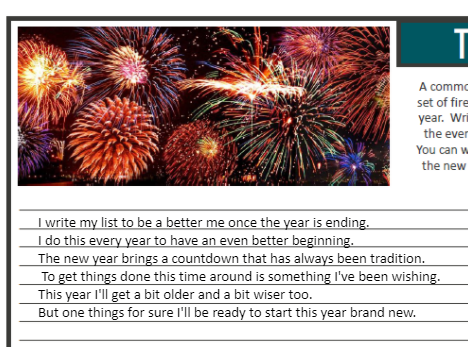
Classroom Screen


 Our technology coach showed us this awesome free website. It’s called Classroom Screen. I use it in my classroom daily. It’s the perfect resource that has plenty of tools available on one screen. All you need is a computer, projector, and internet connection.


First, I want to point out that you have access to several different languages. It converts the text into the language of choice. That’s an excellent opportunity, especially if you teach a foreign language. I think about one of my friends from Louisiana. She’s a Spanish teacher and this would be a perfect tool for her to use in her classroom.


You have the choice to set the background. There are many crisp, clear images that can be used. There are also solid color backgrounds as an option to reduce distraction. My favorite part about this section is you can upload your own image. This allows me to upload images based on the seasons, holidays, or topic discussed in class.


There are several tools available. The best part is it’s all on one screen at a time. The creator really had a classroom teacher in mind. It’s so nice to not have to bounce back and forth between several different windows. I know that there are many wonderful tools integrated in different software programs. I have found that for me personally, this site has everything I need in one easy location.

If you haven’t tried classroomscreen.com, I highly recommend you check it out. You won’t be disappointed. Here’s what my classroom screen looks like this morning.


Monday, April 23, 2018

Flipgrid - I've got the fever!

I must say that I've been diagnosed with Flipgrid Fever! My instructional coach has been working to try and get me to use Flipgrid this school year. I got excited and set up my grid. Then I tried it with one class and just never pursued it from there. The class I tried it with was kind of chaotic towards the Christmas break. So like many things, I put it on the shelf and didn't touch it again.

My kids are now participating in book clubs (literature circles). I decided this was a great way to have them participate in a discussion question, especially since their STAAR writing test was over. My students LOVE this program! It is so easy and they can answer the prompt in 15 seconds. These videos gave me an insight to student's thinking. It was great for my quiet students who I struggle to get to speak to me. They can share their thinking in a space without feeling the pressure of the teacher "hovering" over them.

Here's how easy it is. First step is to go to info.flipgrid.com and sign up. You'll have the opportunity to create one grid for free. The membership is reasonably priced if you are interested in obtaining the full version. So far the free version has been exactly what I need at this time.


My student's have enjoyed doing this activity. I've been getting more out of them, especially my quieter students. It's so exciting to give these students a voice. I'm looking forward to making flipgrid a staple in my classroom. Here's a sample of one of my topics. Please excuse the smiley faces, I wanted to protect my students. I hope that you'll be able to catch the fever too! 


Wednesday, February 28, 2018

OneNote Collaboration

The past week I've been able to collaborate with one of my 7th grade team members in OneNote. We were able to work together to share OneNote with our faculty. It was such a neat experience. We were able to talk about the different ways we use it in our classrooms. I felt like many of our faculty members were very excited about having the opportunity to use this program. That made me even more excited about using OneNote.

I'll be honest, it sure does help to have someone else who's using it too. It gives a sounding board, someone to share ideas with, and to be excited about using it. I know that this year I've been using it on a small scale compared to what the program can do. We've had a few hiccups along the way, but now I have someone to collaborate and troubleshoot with. Here's a sample of our PowerPoint.


Presenting this to our faculty was awesome! After our presentation, we decided to create a OneNote notebook that we could share and collaborate on. We can add pages, test out the collaboration space, and so much more. I feel like this is just the first step in being able to use OneNote to collaborate as teachers. I can see so much potential in this. I can't wait to explore it more in depth.

Friday, February 23, 2018

Twitter


Up until this school year, I've been a twitter dropout. I signed up for an account several years ago. I tried using it. Part of my problem was I liked to write more than 140 characters. I was encouraged by my administration and my humanities coach to really give it a go this year. I dabbled with it a little bit at the beginning of the school year and now it's one of my favorite social media platforms. 

As an educator, there have been so many benefits to using Twitter. First and foremost, I've been able to learn from other educators outside of my circle. I've been able to see the exciting things they are doing in their classrooms. I've learned about OneNote, Workshop model, and just met some inspiring people. 

Another thing,  I've really enjoyed is following authors. The first time an author liked my tweet, I felt like a million bucks. I like being able to give some quick feedback to them, even if they don't have time to answer. Twitter has brought me out of my comfort zone and encouraged me to have the opportunity to reach out to others.

Honestly, I'm so glad that I started to use Twitter this year. I've been able to connect with people that I would have never had the chance to connect with before. I feel like this social media platform has made my search for educational resources much more effective. I can zone in on things I want to learn specifically and network with others about those topics.


Saturday, January 20, 2018

How I'm Using OneNote


Technology is overwhelming at times. If you are like me, you hear/see/explore all these really wonderful ideas. When you sit down to implement them into your classroom, the overwhelming feelings swell up. Instead of spending time getting bogged down in all of those overwhelming feelings, I decided to focus on one thing. Just one... This year my focus is incorporating OneNote into my classroom.

Just before my winter break, I attempted to test run a class notebook with a few students. Some of my PreAP students overheard and wanted to try it too. So I thought why not jump in and try it out completely. We tested out a few things, but didn't delve into it 100%. I set up my class notebooks to reflect my student's classroom binders.  We talked about the Content Library and how that was like my filing cabinet. The students could look at it, but not touch. It took a little time for the students to make sure they were accessing documents from their own folders and not trying to type on mine.After coming back from winter break, I decided that I was going to really try to utilize OneNote in my classroom.

What's in our notebooks?
  • Bellringers - Weekly journal writing bellringers
  • Reader's Notebook - I incorporate ReadWorks passages and NewsELA articles in the notebooks. 
  • Mentor Texts - I'm not sure if I'll use this section next year. I think I'll combine this into my reader's notebook next year
  • Writer's Notebook - Student's writing assignments are located here
  • Stems - Greek and Latin roots
  • Reference - Documents I want them to be able to have for reference
  • Portfolio - Right now it's bare except our 2018 resolution activities
I'm not sure if this is what I'll keep in my class notebooks in the future. I like that I've had the opportunity to try some things out and see what works and what doesn't. I will say that this has helped me think about how to streamline my binders in my classroom. Sometimes less is more, and I'm seeing that with the OneNote class notebooks. It's interesting how the perspective changes when you can visually see the paper trail.  You start to question what's important to keep or use and what's not. 

OneNote Testimonial

I have a student this year who really struggles to write. He doesn't like to write. When I sit and work with him one on one, it's almost like he's in pain trying to write. He struggles to get started. In the beginning of the year, I'd get pages turned in blank. When I'd ask him about the assignment, he'd shut down completely. 

Last week we had a free write. I've been working with my students to spend some time writing down their thoughts, even if it's ugly. They've been building up their writing stamina. This is a sample of his writing. 

It may seem rough around the edges, but I'm so happy that he's finally writing. It gives me something to work with. It gives me a starting point to help him write better. I call this a triumphant moment! He's writing. He's writing because he likes the computer and using OneNote has him writing. That's enough to encourage me to continue to  use the program in my classroom. It will allow me the chance to refine my practices as an educator. My students are eager to try it and that's motivation enough for me.

Samples


I can't wait to see what the rest of the school year holds as I continue to explore all that OneNote has to offer. 


Wednesday, December 20, 2017

OneNote - The Beginning

Image result for microsoft onenote

This month I tried using Microsoft OneNote in my classroom. I've been eager to try it for over a year, but finally jumped in and did it. I was originally going to try it out with a small group of students. Another student overheard and asked to try it too. I took that as a sign to go ahead and launch it with the group.

My regular double block students LOVE using OneNote. It took a bit for them to become comfortable with using it. We still have some kinks to work out, but overall I can see the value in this particular program.

When we return from Winter break, I plan to try to utilize OneNote on a more regular basis. I'm thankful my kids are willing to "try" new technology related things with me. They seem eager to try and are always more than willing to share their opinions with me. Here's a sample of one of my student's bellringer journals. They beg me to continue to do the bellringers on the computer. The sad part is that they are slow typers, but they welcome the practice.


We tried another activity digitally instead of on paper. My students were working on combining sentences using a comma and a conjunction. Instead of running it all off on paper and having the students complete it one paper, they were able to manipulate the sentences using OneNote. 


Things I like about using OneNote:
  • Automatically saves changes.
  • I only create one master and push it out to the student's notebooks.
  • They are learning how to use technology.
  • They look forward to using it.
  • I like being able to have all of the information in one location for the students. 
  • I save time on making copies! 
I look forward to learning how to incorporate this into my classroom on a more frequent basis. 


** The sentence activity is by Jessica Osborne and can be found here on teachers pay teachers.
** The bellringer activity is by The SuperHERO Teacher and can be found here on teachers pay teachers.