The past week I've been able to collaborate with one of my 7th grade team members in OneNote. We were able to work together to share OneNote with our faculty. It was such a neat experience. We were able to talk about the different ways we use it in our classrooms. I felt like many of our faculty members were very excited about having the opportunity to use this program. That made me even more excited about using OneNote.
I'll be honest, it sure does help to have someone else who's using it too. It gives a sounding board, someone to share ideas with, and to be excited about using it. I know that this year I've been using it on a small scale compared to what the program can do. We've had a few hiccups along the way, but now I have someone to collaborate and troubleshoot with. Here's a sample of our PowerPoint.
Presenting this to our faculty was awesome! After our presentation, we decided to create a OneNote notebook that we could share and collaborate on. We can add pages, test out the collaboration space, and so much more. I feel like this is just the first step in being able to use OneNote to collaborate as teachers. I can see so much potential in this. I can't wait to explore it more in depth.
Showing posts with label OneNote. Show all posts
Wednesday, February 28, 2018
Thursday, February 15, 2018
Revealing their thoughts in OneNote
Once a week for the last several weeks, I've been giving my students one writing prompt in OneNote. It is something I found on TPT. It's called 300 Common Core Creative Writing Prompts. I've been able to pick one a week to have the students respond to the picture prompt. I'm really enjoying these. I feel like they are even useful in my writing practice.
I can honestly say I'm so excited about their progress. I'm able to get a better quality answer from many of my students. I find that the quality is better instead of just "how much" they write. Some of the prompts are challenging for my students, but most seem to be easy for them to understand.
How does OneNote make this process more meaningful in the classroom? Honestly, I feel that OneNote has given me better insight into what my students are thinking. I have a group of students who thrive in being able to use their laptops in class. I see the benefit of having students typing their answers into OneNote. It gives them a place to write without feeling judged. As a teacher, I can see what they are working on in real time. I can see their thought process as it unfolds. I feel that it's less pressure for them feeling as tough I'm hovering over their shoulder.
I have students who don't typically write anything. Some of my students struggle to write legibly. Using OneNote has given me opportunities as a teacher that I feel I didn't have before. I really like having the opportunity to have access to their binder at all times. I can go back and reread something, leave feedback for students, and help them with organization.
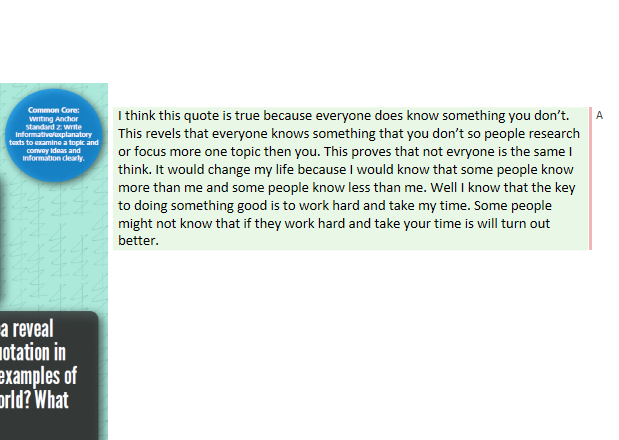
Here are some student samples.
I can honestly say I'm so excited about their progress. I'm able to get a better quality answer from many of my students. I find that the quality is better instead of just "how much" they write. Some of the prompts are challenging for my students, but most seem to be easy for them to understand.
How does OneNote make this process more meaningful in the classroom? Honestly, I feel that OneNote has given me better insight into what my students are thinking. I have a group of students who thrive in being able to use their laptops in class. I see the benefit of having students typing their answers into OneNote. It gives them a place to write without feeling judged. As a teacher, I can see what they are working on in real time. I can see their thought process as it unfolds. I feel that it's less pressure for them feeling as tough I'm hovering over their shoulder.
I have students who don't typically write anything. Some of my students struggle to write legibly. Using OneNote has given me opportunities as a teacher that I feel I didn't have before. I really like having the opportunity to have access to their binder at all times. I can go back and reread something, leave feedback for students, and help them with organization.
Here are some student samples.
Saturday, January 20, 2018
How I'm Using OneNote
Technology is overwhelming at times. If you are like me, you hear/see/explore all these really wonderful ideas. When you sit down to implement them into your classroom, the overwhelming feelings swell up. Instead of spending time getting bogged down in all of those overwhelming feelings, I decided to focus on one thing. Just one... This year my focus is incorporating OneNote into my classroom.
Just before my winter break, I attempted to test run a class notebook with a few students. Some of my PreAP students overheard and wanted to try it too. So I thought why not jump in and try it out completely. We tested out a few things, but didn't delve into it 100%. I set up my class notebooks to reflect my student's classroom binders. We talked about the Content Library and how that was like my filing cabinet. The students could look at it, but not touch. It took a little time for the students to make sure they were accessing documents from their own folders and not trying to type on mine.After coming back from winter break, I decided that I was going to really try to utilize OneNote in my classroom.
What's in our notebooks?
- Bellringers - Weekly journal writing bellringers
- Reader's Notebook - I incorporate ReadWorks passages and NewsELA articles in the notebooks.
- Mentor Texts - I'm not sure if I'll use this section next year. I think I'll combine this into my reader's notebook next year
- Writer's Notebook - Student's writing assignments are located here
- Stems - Greek and Latin roots
- Reference - Documents I want them to be able to have for reference
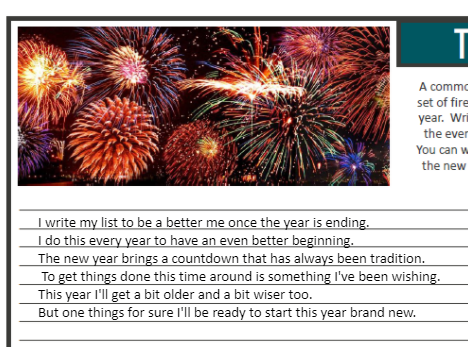
- Portfolio - Right now it's bare except our 2018 resolution activities
I'm not sure if this is what I'll keep in my class notebooks in the future. I like that I've had the opportunity to try some things out and see what works and what doesn't. I will say that this has helped me think about how to streamline my binders in my classroom. Sometimes less is more, and I'm seeing that with the OneNote class notebooks. It's interesting how the perspective changes when you can visually see the paper trail. You start to question what's important to keep or use and what's not.
OneNote Testimonial
I have a student this year who really struggles to write. He doesn't like to write. When I sit and work with him one on one, it's almost like he's in pain trying to write. He struggles to get started. In the beginning of the year, I'd get pages turned in blank. When I'd ask him about the assignment, he'd shut down completely.
Last week we had a free write. I've been working with my students to spend some time writing down their thoughts, even if it's ugly. They've been building up their writing stamina. This is a sample of his writing.
It may seem rough around the edges, but I'm so happy that he's finally writing. It gives me something to work with. It gives me a starting point to help him write better. I call this a triumphant moment! He's writing. He's writing because he likes the computer and using OneNote has him writing. That's enough to encourage me to continue to use the program in my classroom. It will allow me the chance to refine my practices as an educator. My students are eager to try it and that's motivation enough for me.
Samples
Samples
I can't wait to see what the rest of the school year holds as I continue to explore all that OneNote has to offer.
Wednesday, December 20, 2017
OneNote - The Beginning

This month I tried using Microsoft OneNote in my classroom. I've been eager to try it for over a year, but finally jumped in and did it. I was originally going to try it out with a small group of students. Another student overheard and asked to try it too. I took that as a sign to go ahead and launch it with the group.
My regular double block students LOVE using OneNote. It took a bit for them to become comfortable with using it. We still have some kinks to work out, but overall I can see the value in this particular program.
When we return from Winter break, I plan to try to utilize OneNote on a more regular basis. I'm thankful my kids are willing to "try" new technology related things with me. They seem eager to try and are always more than willing to share their opinions with me. Here's a sample of one of my student's bellringer journals. They beg me to continue to do the bellringers on the computer. The sad part is that they are slow typers, but they welcome the practice.
We tried another activity digitally instead of on paper. My students were working on combining sentences using a comma and a conjunction. Instead of running it all off on paper and having the students complete it one paper, they were able to manipulate the sentences using OneNote.
Things I like about using OneNote:
- Automatically saves changes.
- I only create one master and push it out to the student's notebooks.
- They are learning how to use technology.
- They look forward to using it.
- I like being able to have all of the information in one location for the students.
- I save time on making copies!
I look forward to learning how to incorporate this into my classroom on a more frequent basis.
** The sentence activity is by Jessica Osborne and can be found here on teachers pay teachers.
** The bellringer activity is by The SuperHERO Teacher and can be found here on teachers pay teachers.
Subscribe to:
Posts (Atom)